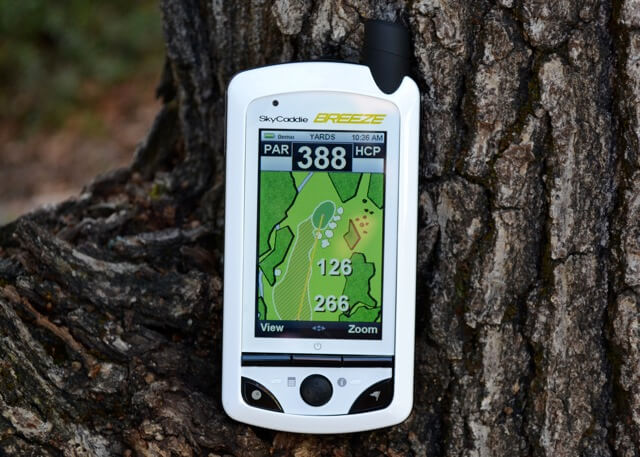


Win a SkyCaddie Breeze
To enter to win a SkyCaddie Breeze, just leave a comment below telling us which upgrade feature(s) you would use the most.
What’s a Radio?
(Written by Golfspy Dave) Do you remember your first new car purchase? For me, that car was a Honda Civic Coupe. I was super excited to get a car that was not previously driven by anyone else. I was in grad school at the time and my wife was working for the City of Scottsdale’s Rec and Parks district. For those of you not in the know, these jobs are not a recipe for fiscal dominance. We could afford that new Honda, but just barely. The only option we selected was AC as living in Arizona without it would have been most uncomfortable. It was really the only option we selected. Rather than a car stereo, we had a hole in the dash where the radio should go. No biggie, we saved some cash and added the additional options (CD player, 22’s, airbags, & etc.) later on when we really needed them and could afford them.
I love buying new cars, selecting the options I need (want?), and passing on those I don’t. I feel for all of you who need plug in engine block warmers, but my Cali climate makes buying that option silly. Car buyers can select what makes sense. Sometimes I wish that the new-car-buying model was present in other purchases.
You Choose Your Features
How many features are present in our stuff that we never use? I probably have ten settings on my microwave oven that have never been selected. What if your electronics could be equipped with only the features that you will actually use? What if this also eliminated the need to pay for the features that you don’t need? Sounds good, huh? Pay for what you want; don’t for what you don’t.
This is the scheme behind the simple, yet upgradable, Skycaddie Breeze GPS unit. Out of the box, the SkyCaddie Breeze gives you an accurate, affordable, but initially minimally featured GPS unit. The beauty of the Breeze, especially compared to other lower-cost GPS units out there, is that although it starts out minimally featured, it’s still a SkyCaddie, and if you want more features, they are just a paid upgrade away.
AESTHETICS & DESIGN
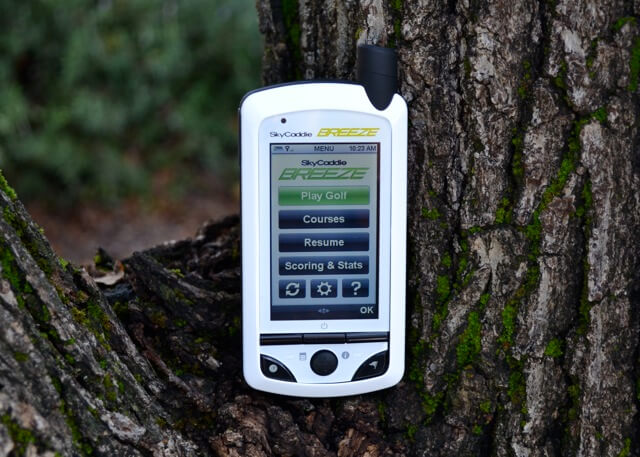
Overall, I think that we are looking at an attractive visual package with the SkyCaddie Breeze. The black and white color scheme, though not revolutionary, serves as a clean background for the large, full-color screen. The control buttons are all conveniently located at the bottom of the unit, with the directional control button (joystick?) sitting right in the middle. While the front of the unit may be plastic, the back has more of a finger grabbing rubber surface. The large directional button is also rubbery with a couple of traction bumps that are very effective at holding the button to the finger. Although it is larger than my iPhone 4S, the Breeze never felt bulky, instead, I would describe the hand-feel as comfortable.
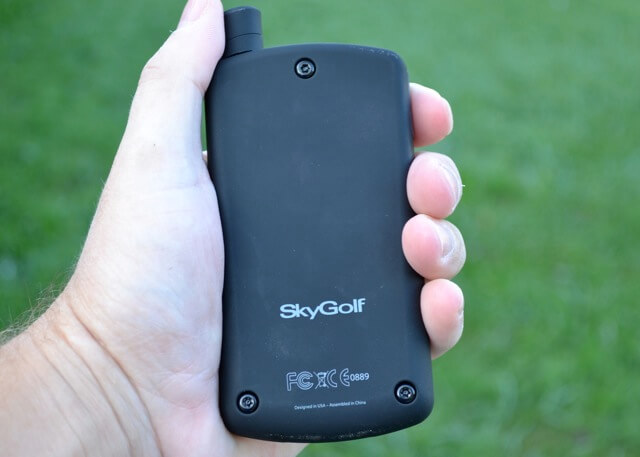
Bucking the current design trend, the large, high-res display on the SkyCaddie Breeze is not a touch screen. The directional button instead directs the operations that would be otherwise controlled by touch. Maybe the ability to touch the screen would make navigation a bit faster, but once I became comfortable with the button system, it was likely no real speed difference. If nothing else, not touching the screen should extend the life of that screen. SkyCaddie also helps in that direction by including screen protector film with the unit. I appreciate that having paid for my iPhone screen films.
Really, the only part of the unit that takes a bit away from the aesthetics is the antenna on the top. They have done a good job of blending it in, but the antenna is still there. Not like they can remove it to make the unit appear more symmetrical though. That would be like taking the head off of your driver to preserve the visual lines of the shaft. The antenna represents a critical functional component for the unit, and although it would be nice not to have the big bump on the top, it needs to be there.
AESTHETICS & DESIGN SCORE = 20/20
PERFORMANCE
So what do you need your GPS to do for you on the course?
- Give accurate yardages to multiple important targets (front, middle, back, traps, doglegs, & etc.)
- Be fast
- Have a strong enough battery
- Have data for all of the courses I play.
- Keep my score and play statistics
- Be easy to use.
- Have something extra to separate it from my iPhone or laser rangefinder
1. Give accurate yardages
Some of you are likely already grumbling about SkyCaddie charging an annual membership fee. I get it. Why pay this membership when your phone app doesn’t require it? Let me tell you why. The SkyCaddie Breeze is the most accurate (non-laser) rangefinder that I have ever used. Period. End of story. We have all seen the commercials with the guy sporting the space-age backpack walking the golf course. This direct measuring must be expensive, and this expense needs to be passed along to the consumer. In my opinion, the SkyCaddie accuracy is well worth the annual subscriber fee. There were holes where the yardage given on my iPhone app GPS was off by 5-10 yards compared to the SkyCaddie Breeze. Laser testing showed time and time again that the Breeze gave the better, more accurate, number. Should accuracy matter to you in a GPS, then the membership cost is money well spent. They are even running a buy two years, get one free promotion right now. You get that and some discount vouchers for other golf stuff. Check all of it out HERE.
2. Be Fast
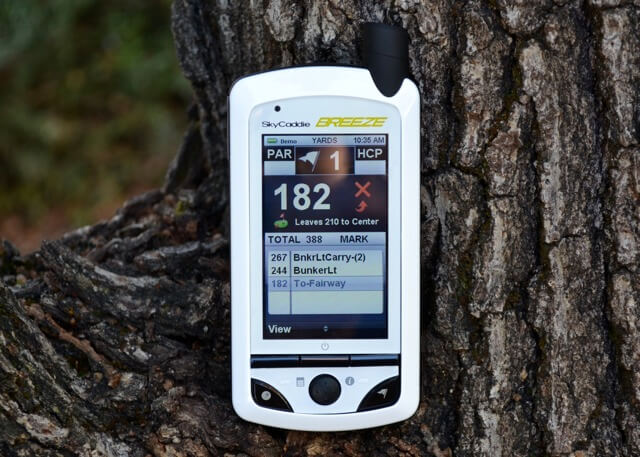
The speed of the SkyCaddy Breeze gets some cheers and jeers from me. First, the cheers. Once you have selected your course and are on that first tee, the SkyCaddie Breeze is a quick, number-spitting machine. When you walk up to your ball, it takes only a second or two to settle on the number. In Basic Mode, this means you immediately get Front/Center/Back or green. Other numbers provided after upgrading your feature package (more on this later) are just as quick. While some of the speed can be attributed to the fancy electronics in the unit, the other thing that makes the Breeze such a fast instrument is the simple fact that it stays on while you play. No sleeping, no powering up, entering passcode, selecting the app, and so on. You look at it, and get the number.
My speed jeer with the Breeze comes once you begin the course selection process at the course. If you just press the Play Golf button, the unit gives you a picture of the Earth and begins a scanning process that takes a few minutes. Once completed, it selects your course, and you go play. To save time, instead of pressing the Play Golf button, go to Courses and manually select your course. This cuts down on the wait time by a great deal and prevents the unit from selecting the wrong course should there be multiple courses where you are playing.
3. Have a strong enough battery
I think that SkyCaddie is a bit concerned about battery life with the Breeze, as they suggest both in the documentation and in the software that you plug in the SkyCaddie Breeze after each round. There is a great deal of processing going on and the screen staying on does take juice. I think that they are being a bit over cautious though. I have found that the unit stays charged in between rounds and that it made it through 36 (OK Tony, Matt, and Frank, it was 34 holes) last Saturday without a problem. I think that the battery life is more than sufficient, but I do follow their guidelines of plugging it in after play. It does also charge fairly rapidly.
4. Have data for all of the courses I play.
“30,000 course maps are pre loaded and ready-to-play out of the box with Basic green information”. If you play less than 30K courses, you are all set. The unit also holds 50 “full-featured” courses that you select via download. I don’t imagine that many people will need more than 50 courses at any given time, and if they do, they can download ones to swap in/out once the unit is synced to a computer.
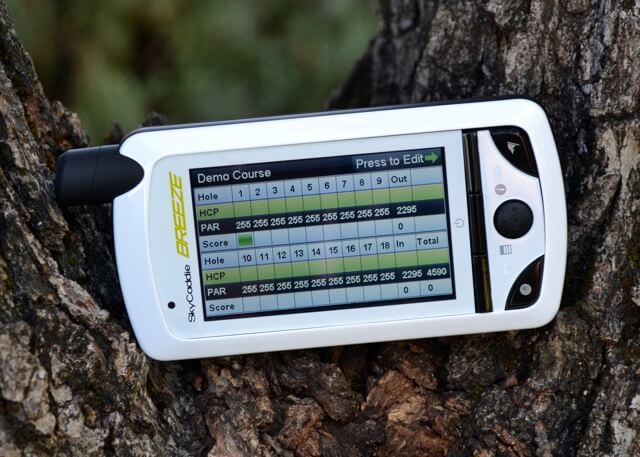
5. Keep my score and my play statistics.
The SkyCaddie Breeze does have a score keeping function and the ability to track play in the ClubSG (beta) section of their website. Scorekeeping is pretty straightforward. You are given the option to keep score at the beginning of the round and then the unit will automatically advance to the enter score screen as you move to the next tee box. Should you somehow get off track, you can either head to the scorecard through the menus, or if you have the option selected, turn the unit 90° to the left and the scorecard pops up. Nice and simple, though you should expect a bit of lag between screens if you go the menu route.
I think that the online ClubSG section shows some promise, but I feel it is a bit behind some of the other offerings out there. I would like to see some additional stats included in the scorekeeping; sand, penalties, OB, & so on. Some of the phone apps and other GPS units have this data, and I personally like having it. Having the sand and penalty shots cataloged lets me remember the holes more accurately when I get into the online sites to review my rounds. To their defense, the ClubSG portal is overtly labeled as “Beta”. What they have up right now is solid, but they will need to expand the stat tracking and add some features like being able to view course layouts from the computer if they are going to compete with the other units’ online portals.
6. Be easy to use
Once you get the gist of the SkyGolf operating system, usage is very easy. However, being that this was the first SkyCaddie unit that I have used, I did have a bit of a learning curve, and I did even have to read the instructions. I’ll admit that this part was a bit of a bummer, or maybe better stated as a blow to my ego. The Breeze has a great many options for play, especially once you upgrade it. As such, you need to know where the control for these options resides in the menu architecture. It’s not a huge knock on the unit, just more of a FYI to the consumer. I think if it this way. If I was driving to your house right now, I’d use Google Maps to learn how to get there. The next time, I’d probably be OK without the directions. For you tech guys, this concept is nothing new. RTFM=Success.
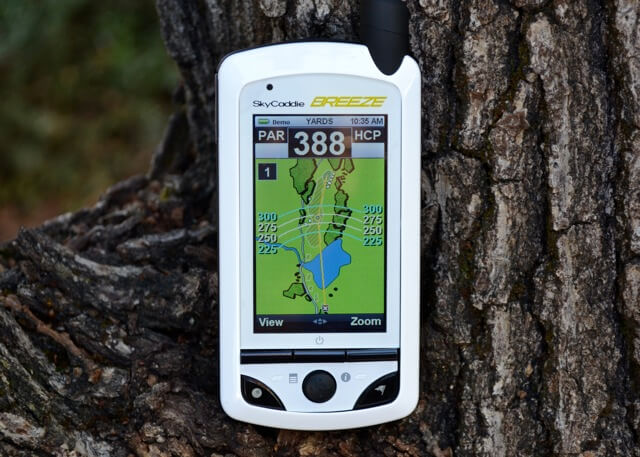
On the course the unit is in fact, a breeze to use. Sorry about that, but it is very simple. Single button presses will change the displayed data/view. Turing the unit 90° takes you to the scorecard, main view, or simple Front/Middle/Back yardages. You can even tell the unit at which yardage you want it to switch from fairway to green view in the preferences. There is some complexity in figuring out the settings, but once that is learned, and your preferences set, you can play golf and not worry about how to get the unit to work.
7. Have something extra to separate it from my iPhone or laser rangefinder
And so we are back to my first Honda. Out of the box, the Breeze is a very basic GPS unit. Don’t take that as a knock on the unit. Like that stock Civic, the basic Breeze is a great basic unit, it just doesn’t have any fancy options. The basic unit does let you see distances, record your shot distances, score, and some stats. It also has a bright, color display and uses the walk-the-course mapping system common to all SkyCaddie models. Remember, a Mercedes without all the fancy options is still a Mercedes. Like a car, the SkyCaddie Breeze can be upgraded. There are three upgrade packs available, each costing about $35. This is what comes in the upgrade packs (from the SkyGolf site):
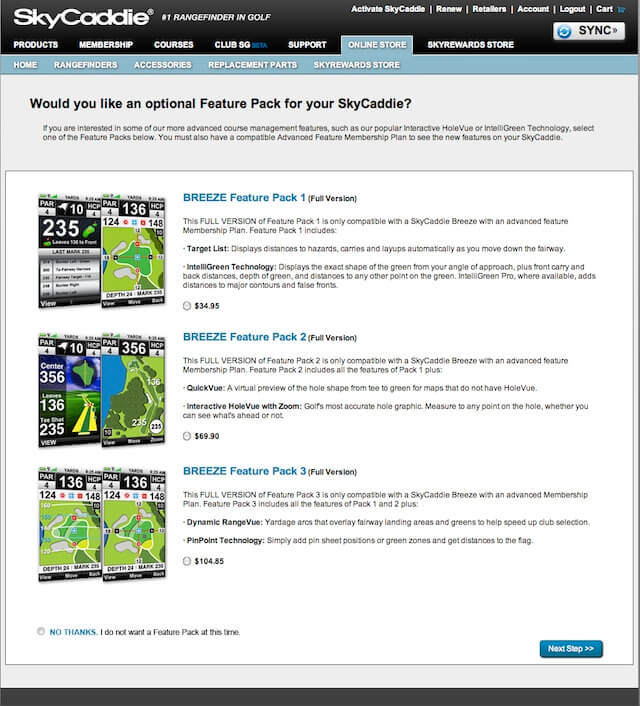
In testing the SkyCaddie Breeze, I first played rounds with the unit in the basic mode, then added upgrades one at a time to see the difference in play. While the basic configuration was OK, it did leave me wanting more features. Of the features present in the upgrades, my favorites are the Target List, IntelliGreen, Interactive HoleVue, and Dynamic RangeVue.
It’s not that the other features are not useful, they are just more situational. Not every course will have the Pro data for the greens or the updated PinPoint measurements. YMMV as to the importance of the upgraded features based upon where you play. I think that the best Pack is #1 in terms of usefulness. You can actually get a pretty exact number to the pin by moving the targeting spot to where you see the flag on the green. I really like the RangeVue display as well because it gives you an idea about where your miss may go should it go offline.
Overall, I really like the ability to upgrade the Breeze to have the features that you will actually use. My only suggestion would be to have the six options as single $17.50 options rather than $35 pairs. I would definitely recommend the previously mentioned four favorite features to everyone who gets a Breeze. The great thing about the Breeze is you get to choose what upgraded features are worth paying extra for. One little bonus FYI, when you upgrade your features, you will need to download the advanced versions of your courses. Just hit the download courses after each upgrade. You’re welcome.
PERFORMANCE SCORE = 56/60
VALUE
The SkyCaddie Breeze retails for $229.95. But you can find it here for $219. While this price does not get you all of the features of the higher-end SkyCaddie models, it does get you their SkyCaddie mapping accuracy and hardware. As mentioned, the upgrades cost $35 each and the memberships run from $29.95-$59.95 per year. Should you upgrade the unit completely, you will be in for about $370 including the unit cost, upgrade costs, and “birdie” membership. This now gives you a unit that compares favorably in price against SkyCaddie’s fully-featured SGXw unit that costs $399.95.
That’s not the story of value though. The story of the SkyCaddie Breeze is that you can now by a less expensive GPS unit that still has all of the SkyCaddie pedigree, and then add features to it when you decide you need them down the road. I think that this ability helps the Breeze to score well in initial “Value”, and it also adds to its value down the road. Does it cost more than a phone app? Sure, but it also does a better job than those apps and to be fair, costs a whole lot less than that app and your phone.
VALUE SCORE = 20/20
IN CONCLUSION
The ability to upgrade the SkyCaddie Breeze is great, but let’s not get away from the fact that this is the most accurate GPS unit that I have ever tested. Is there a learning curve to figure out how to use all of its features? Sure. Would I like to see the data collection and online analysis expanded? Of course. However, these are but little tweaks that would only add to an already solid little unit. If you are looking to pick up a GPS this holiday season, I would strongly recommend you give the SkyCaddie Breeze a long, hard look. Check the SkyGolf site for some December promotions as well.
TOTAL SCORE = 96/100
Visit the SkyCaddie Website: >> HERE
Follow SkyGolf on Twitter: >> @SkyCaddie
Win a SkyCaddie Breeze
To enter to win a SkyCaddie Breeze, just leave a comment below telling us which upgrade feature(s) you would use the most.





{ 111 comments… read them below or add one }
I have a feeling that given the opportunity I would use the target list upgrade the most. (Really the target list epitomizes, for me at least, the advantages of GPS units)
Great review Dave. – It’s definitely a very intriguing product.
I walked my home course with Paul Reed from Skycaddie UK/EU. The work they do is incredibly accurate. It separates them from everyone else. I’m not sure that people know how they work. That’s why I’m writing an article about Paul and our walk at Fana GC – my club and course.
This new concept of upgrading is excellent. Makes it easier for Skycaddie too. They can manufacture just one device for everyone. It’s like the multi loft clubs – one head for everyone
I think that I would use the pin-point technology the most. Sure, having the yardage and playing for the center of the green is always a pretty good plan, once in awhile, knowing the pint-point yardage to a tucked away flag may give me a birdie putt…golf is a game of inches so every little bit helps. The only drawback is that I am on the other end of the putter…
I’d use Target List the most, followed closely by Intelligreen.
Seems like a great idea, but if you did end up purchasing all three upgrades it seems like the SGXw would be a better deal. It’s on sale right now for $329.
the pin-point technology most likely
Definitely Target list… keeps your mind focused on the next shot…
Love the site, and your giveaways(duh)! I think I would use the target list the most, and pack 1 is probably the only one I would upgrade to.
Thanks for the review, I’m just getting ready to get another GPS unit. Hopefully I’ll win this, but I’ll probably buy this one if I don’t.
As far as the membership goes, I’m used to that with the Golf Logix I have now.
The target list
I’d use the stats tracking, and of course the target list and intelligreen. My old Skycaddie has seen better days.. lol
Love the look of this device.
Was looking at the Garmin g6 for my dad but after this review it makes me pause. He would probably want the SP3 because of the ability for pin position. I would be good with just knowing the direction to the green.
Thanks for the review and making it that much harder to decide.
Best of luck to all!
Intelligreen to give me the best chance at Birdie.
I would use range view a lot.
Accuracy, speed, and target list are most important to me. But let’s not forget “small” features like the rubber backing, illumination, and battery life.
Target list would be mine!
I like the SkyCaddies products, they are the most accurate at my course. I have an old SG5 I want to give to my nephew, so this would be a great upgrade.
Speed, Accuracy, and keeping stats is what I like to do. Club SG is not a be all end all, but its great for a quick glance at where you are losing shots.
I like the new look and the score keeping ability.
I would get the feature pack 2 as I would use the Quick Vue a lot.
#3. Have a strong battery.
It been my experience with various rechargeable gadgets that the battery life declines after every recharge and eventually the battery needs to be replaced. The review did not address whether the rechargeable battery is replaceable by the owner. If so; please share in a update of the review. Thanks for the positive review.
For myself, it would be the target list and intelligreen. I agree it would be nice to have the ability to be these upgrades individually and not paired.
I wish all of these devices would either give the option of using regular batteries or use only regular batteries. I know it cost more but inevitably we forget to charge them, to me thats the biggest reason why I keep my bushnell laser, one or two 9v a season and it never fails.
Definitely the stat tracking.
Golfspy Dave,
I would like to commend you on a job well done. Your review was thorough, informative, and engaging to read.
As one of the admins on ClubSG, I wanted to let you know that we offer the stats you said you’d like to see (sand shot, penalty stroke, O.B., etc.). In fact, we currently offer over 50 basic and advanced stats (and plan to add more). In the screen shot of your score you included in your review, if you click “Stat Settings”, you can seen all of our stats.
We’re always looking to improve ClubSG and my takeaway from your review is we need to make the additional stats more obvious. If you missed it then others probably missed it too.
Again, thanks for the solid review and happy golfing!
Nathan, it’s nice to see an admin who takes initiative to look and see what the actual users are saying and to then offer advice and look for ways to make things easier to use.
Thanks a bunch Nathan. Looks like I did miss this. Where on the score entry screen in the unit is the spot to enter sand and all of that?
No worries.
Scoring on the device was designed to be simple so you can only enter your Score, Fairway, and Putting. Plus, you can record your Tee Shot Distance using the Mark Ball button and it will automatically upload with your score to ClubSG. From those four stats, we can automatically calculate around 30 different stats.
Once your score is in ClubSG, you can track additional manual stats like Sand, Penalty Strokes, etc.
OK that makes sense. I thought that I had missed the penalty and sand entry page on the Breeze itself.
Thanks a bunch for your follow-up!
Dave, You missed nothing. Tell me when you find the penalty and sand entry page on the Breeze itself. Nathan certainly wouldn’t want to correct you.
And when has ClubSG ever been updated, all they did was buy OOBGolf and copy that as their web scoring. Go look yourself.
As a new user you certainly don’t know about their dirty underbelly, or heavy handedness on their forums. Go review that.
Thanks for the opportunity! Been using my Garmin GPS8 for over 4 years now. Love the look and feature of the Breeze. I’d probably want the Feature Pack 1. It seems the best for my brand of golf.
I like the QuickVue. I wonder if any thought has been given to offer it a la carte
I think the target list would benefit me and my game best.
Great review!
I would use the target list the most.
The target list looks pretty interesting.
I love that it keeps accurate statistics on my rounds !!! I need that !!
Stat tracking would be great. Would benefit from that a lot, especially considering it also does loads of other things, I don’t have to carry a bunch of tools for each job.
Great review.
Very nice review and unique product . I would use the target list upgrade feature the most.
I completely agree with you that each feature should be able to be added separately at it’s own cost point. I would buy Target List and Dynamic RangeVue immediately if that were the case. However, like care companies to use your analogy, they make more money by putting them in packages and making you pay for the ones you don’t really care much about. I would guess that Dynamic RangeVue would be on most everyone’s list and that is why it’s only available by purchasing the complete upgrade.
Care companies…LOL…CAR companies.
Target list
I love the ability to customize anything. One size doesn’t fit most people, especially golfers. I like the Feature Pack #2 which seems to have just enough technology along with great ease of use. The Quickvue feature looks to be the one that would be a must for me. Thanks for the informative review on the Breeze.
Looks pretty sweet. For me it would have to be the target list.
Intelligreen. I’ve used a Skycaddie before with it and it’s well worth it.
I think I’d use the Inteligreen feature the most. It would be nice to see the lay of the green, especially when playing newer courses.
Definitely Target list and pin-point!
I would like the Interactive HoleVue the most. Thanks for the opportunity. I’d really love to have one.
You can keep all the fancy graphics, all I want is the numbers and the bigger horizontal display option is great feature. I have to say it seems somewhat mean that you can spend $230 on the Breeze then have to spend more to get the unit to tell you the distance to hazards! Then there is the thorny issue of ongoing membership.
Actual aerial maps instead of graphic displays would make for the ideal unit. Vastly improved battery life would be nice too.
34 holes? Cannot make it thru two rounds in one day? My golf buddy lasts 3 rounds over 3 days easily and is accurate enough for me and no membership fees annually and preloaded.
The breeze sounds more like hot air to me.
More money for less value than my unit.
I will stick with my golf buddy world that costs less than the basic breeze unit.
So you don’t want to be entered into the contest then…?
As for the 34 holes. The unit says to recharge after the round and I was showing that it was fine to use for two rounds. Not finishing the last two holes was due to darkness, not battery issues.
I love the options that this gives you. Can’t say I’ve ever bought a car new, but certainly love the idea of picking and choosing features. For me, I could see the Intelligreen feature helping me out the most.
I think the stat tracking would help my game.
Only have experience on the free phone apps. Intelligreen sounds nice along with good stat tracking.
I have an older Sky Caddie and love it. The feature I miss the most on my current unit is the full overhead views showing yardage to hazards, etc. I can get there with my unit but it takes some work..
A great round is golf for me is where I limit the damage by knowing where the trouble lies and staying away from it. For that reason the simple package 1 with target list would be crucial.
The Target List in the Feature Pack 1 would be the most used.
It is sort of a rip that you have to pay a fee every year to use the gizmo though.
If you play less than ten courses per year in most years, it just seems like a ripoff to have to pay that annual fee. Seems like they should just have the initial courses loaded as part of your cost of purchase, and if you wanted to add courses later, you could do so individually at a nominal fee.
Target List is my most used app.
DYNAMIC RANGE VIEW is one of the best options…a laser or any GPS can give you yardages to the flag (or green), but these arcs let you find a safe spot to hit a lay up. Saving strokes is equally as important as making ‘em!
I would chose to upgrade the battery life. I think my existing Sky caddie is great but it usually lasts for 30-32 holes leaving me in the dark for the end of my second round.
I have owned sky caddies for 6 years. Overall very satisfied. Biggest gripe over the years. Software.
Their site has been a real pain. Seems like I have to download program every time I try to update. I have SGXw and it works better than using a PC. On the course the screen sometimes freezes and I have to reboot the SkyCaddie. Pain in the butt. Sometimes screen is showing 50% of two different pages. Another reboot. grrrrrr…. Scoring page is hard to see for mature players.
Sky Club has been Beta for three years now. I do like keeping track of rounds. I agree other statistics would be helpful if I could add on while playing. i.e.. drive distance sand or traps.
SkyCaddie is not perfect but I keep buying them.
I think this is a great gps. I currently have the G 3.5 and this new one with having 50 different cources is a great feature I would use.
I would actually use the target list when working from the tee box down the fairway and then once getting within 180 yards or so switch to the pin-point accuracy to really get the ball close to the hole. The score card is also a great feature since I don’t always remember to grab one, or if its raining a little, it doesn’t get all mushy.
I like the size and charging process. I have a SG4 and hate the charging process.
Thanks
Bill
I hate the charging process on my SG4. I hope the new unit is a plug-in. I like the color on the new one too.
Thanks Bill
I do understand membership fees. I want the flexibility to have my Florida courses but wish I didn’t have to pay an upgrade to take the unit on vacation to use at coursrs outside my paid subscriber area.
Love new idea of the breeze .getting tried of everybody gps getting old and wrong
I would love to upgrade to this. My current GPS involves my eyes, a guess and my feet.
Score keeper
Skycadie is the most accurate I like the scorecard
I would probably use the Target List the most… course management is something I’m working on and knowing the yardage to every feature of the hole would help me “think” through the round better.
I have used SkyCaddy for years, currently using the SGX. You’re spot on them being the most accurate golf GPS available! I’d put the full boat of upgrades on my breeze if I had it!
I would find the dynamic range view the most useful. That is something I have always thought would be nice.
I would have to say the pin point tech for me.
Feature Pack 1, Intelligreen and Hazard list for me.
The built in scorecard is one feature that would help me!
Distance accuracy is great and helps my score, but getting better over time for me is about stats. I really hope that they upgrade the data keeping in an easy to use manner so that I can see my penalties, GIR, Putts, and maybe even shot mapping to a computer like mountain bikers can get on their GPS. The scorecard can be what sets this apart.
Pinpoint flag feature would help my game the most, ability to enter pin placements should help. I find GPS units less accurate than laser because of lack of pin placement. I live in an area where hilly courses make it very diffucult to see the green. Intelligeen would also be very helpful.
I would definitely favor the score keeping upgrade. a great feature
great product
I would use the Target List feature, of course, if I won it, I get all the options !
I would get the Interactive HoleVue upgrade.
I think the 2nd upgrade package would suit me the best. I like the being able to see the entire hole. It helps me to set up my strategy for playing the hole.
I have a question. When you enter your statistics on the unit are they uploaded to the website or do you have to connect to the website to upload them?
The Target list would my first choice
The Intelligreen Technology feature seems like a great upgrade. Anything to help assist me in puttng, from a green reading standpoint, is ALWAYS a positive in my book.
The target list and interactive hole vue would greayly help my game. I am in the midst of replacing my other Sky Caddie and this article was a great help.
My personal preference would be #1. Personally, I am not interested in all the data that is available. A good yardage and an idea what’s ahead works for me. Too many golfers want all the extra stuff, and don’t know how far their 7 iron goes, causing the dreadfull slow golfer.
Accurate distance is a huge thing
I definitely would use the #1 package the most, although I would likely buy all 3.
easily being fast and accurate and also looks so good
What a great idea.
Intelligreen and tragic list.
I could truly use accurate yardage features, I now use the SG4, an am sometimes amazed at the inaccuracies at certain spots on my course.
Target List is definitely the option I would use and value the most. Its automatic updating is a brilliant feature. I see my birdie count soaring in the Breeze!
Not sure f I would use it most, but I really like the statistics feature. Definitly would use the target listing plenty.
I would go full boat with option 3. I loved my SG-2, still love my SG-5 and would truely love a full boat new BREEZE.
the additional feature that I would use is definitely the target list
If this statement is true:
“The unit also holds 50 “full-featured” courses that you select via download.” then this might be the perfect unit for me. I have only played something like 80 different courses in the time I have been golfing.
And the biggest gripe I have against Skycaddie is the yearly fee. I know their mapping is better than what I get with my free Sonocaddie downloads (they use satellites like most other GPS units) but I hate paying for things like this year in and year out. Units like these have a shelf life, why can’t they simply charge you for it up front and when the unit dies, you get another one and they take it out of the cost of the new one again?
One hopes this is a harbinger of upgradeable devices. That being said, I’m torn between Target List and Dynamic RangeVue. It reminds me of cable packages in that regard: how you really only need a few channels but somehow they’re neatly spread out over three or four packages. Were I pressed, I suppose Dynamic RangeVue would suit my game best, since I’m off the fairway as often as I’m on it. However, as someone else said, I think, before long, everything would be added, even if it’s just to try it all out. I wonder, then, if I could deselect certain features. Hmm.
Thanks for another superior review. My favorites are the Target List, IntelliGreen, Interactive HoleVue, and Dynamic RangeVue. I would not use the Interactive HoleVue on the course, but I hope the device lets you use it to preview a course and build a preliminary strategy, otherwise, I would probably just use it the first round at a new course.
This unit sounds great. It seems easy enough to use it and with a bigger screen it seems
that this is the way to go. I like the feature that you can keep track of the distance of each
of your clubs.
Brian Predmest
target list……however, I currently have a 5….and my jury is still out on negative reviews….to upgrade.
love my 5…but newer gps has better green features…and taget features.
why no touchscreen???
need more reviews..thanks
well for me I don’t need alot of features, however the most basic package for me would be fine. Yes I could find outher products which would take up less space and not have to hold it every time I needed the distance, however having the view fo the hole lay out is a requirement, espeically if you haven’t played the course.
Jjust one person requirement!
I would purchase upgrade #1 – the IntelliGreen feature was great on my stolen SG5
Like many, I would have to go with Target List
I like the Target List because that is the most help when playing a new course for those blind shots that you have no idea how far or where some of those hazards are.
package #2 would work for me
I would upgrade to package #2.
I would definitely upgrade to include Intelligreen and Target list.
Thank you for the review. Still can’t make up my mind between SkyCaddie and laser finders. Like the idea of the Intelligreen upgrade. Think it would help with club selection for approach shots.
The pin popint technology would be the most used feature I would think.
Dynamic RangeVue!
Why does everyone “bag” on Skycaddie. It seems everyone is always rating them below Garmin G6 because of the annual fee, but it seems that functionally it is superior to the G6. What is is the best GPS without price biasing the final conclusion?
I use the old Skycaddie SG3. I have found that as these newer GPS units with color screens (doesn’t help the golf shot at all), rechargeable batteries (which are nearly dead in 2-3 years) and a myriad of other paid options simply distract one from actually playing golf. My SG3 gives the ‘Target List’, you can move the ‘X’ to the Pin position for front, center, back and actually to the pin. It uses regular batteries so it’s always ready. While I appreciate Skygolf constantly improving their GPS product, I’ll stick to my SG3 as it’s the golf shots I play for not playing on the GPS.
Target List would be one of the upgrades I would use; Intelligreen is a close second.
Pin Point sounds cool. But here’s the probelm. I have a SkyCaddie SG4 – “Fully Loaded” already, so why would I want to upgrade AND have to add all those feature packs. Seems like I’m not getting a “good enough” discount to upgrade – not to mention the annual subscription fee that no one else seems to haev anymore!